Lekha Odia Typing Platform Guide

Lekha (lekha.odisha.gov.in) is the official Odisha government Odia typing platform used for OSSC and OSSSC typing exams. It uses the InScript keyboard layout and provides a browser-based typing interface. To practice, visit lekha.odisha.gov.in, select the Odia typing option, and start the test.

Frequently Asked Questions

Is Lekha the same as the actual OSSC exam?

The Lekha platform uses the same InScript layout and similar interface to official exams. Practicing on Lekha is excellent preparation for the real test.
See Our Odia Typing Platform in Action

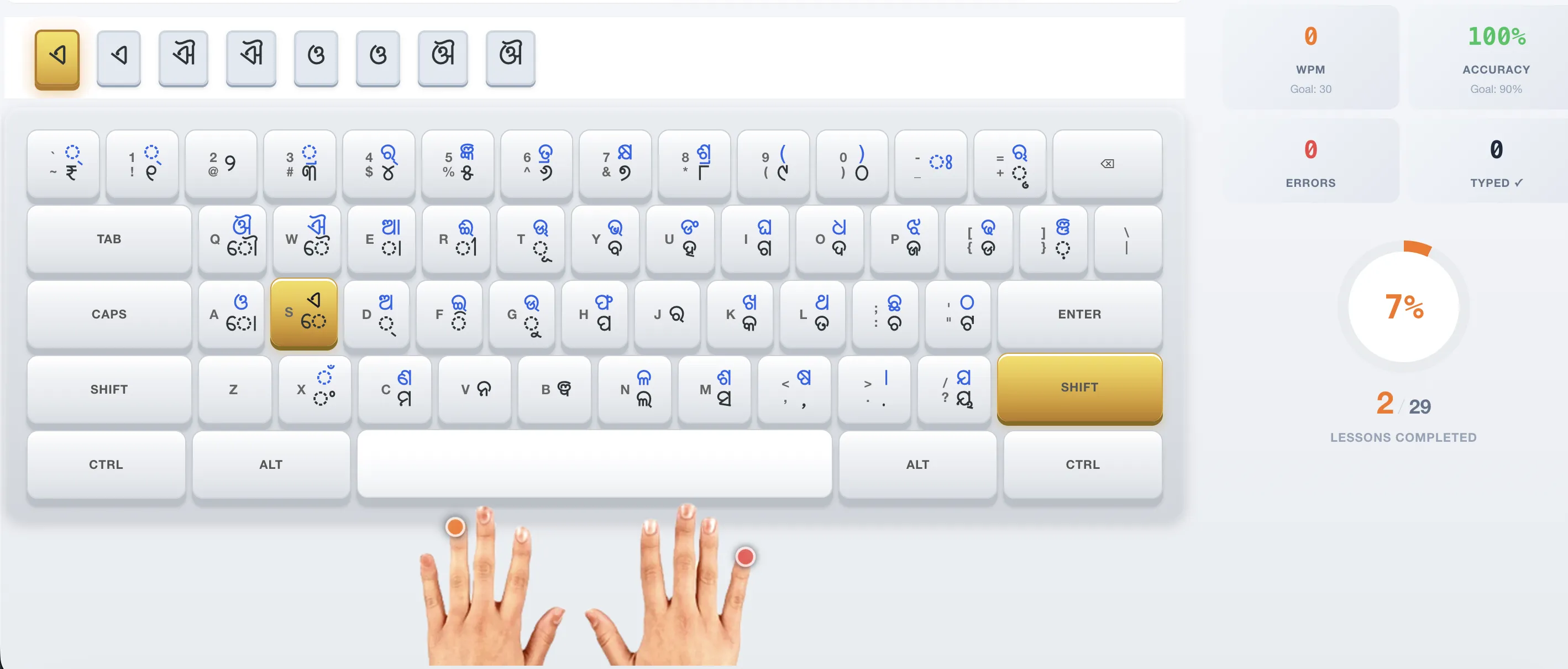
Our interactive typing interface puts the official InScript keyboard right on your screen. Each Odia character is displayed on its corresponding key — no guessing, no toggling. As you type, your WPM, accuracy, and OSSC score update in real time.

  • Visual InScript keyboard — see exactly which key produces which Odia character
  • Live WPM counter, accuracy meter, and OSSC-style scoring
  • Lesson selector with progress tracking — pick up where you left off
  • Works instantly in your browser — no installation, no signup required
Try It Now — Free →
Odia typing course interface showing InScript keyboard, live WPM tracking, and Odia text practice area