1. Why Learn Odia Typing in Computer?
Learning Odia typing in computer is no longer optional for anyone targeting government jobs in Odisha. The Odisha Staff Selection Commission (OSSC) and Odisha Sub-ordinate Staff Selection Commission (OSSSC) both conduct dedicated typing skill tests for specific posts.
But beyond exams, being able to type in Odia opens doors — from creating official correspondence in government offices to content writing, journalism, and digital publishing in the Odia language. With India's push toward digital governance, Odia typing skills are becoming increasingly valuable.
Government Guideline: As per OSSC rules, the typing skill test is conducted on computers using the Odia InScript keyboard layout (BIS IS 16350 standard). No other keyboard layout or input method is permitted.
2. Install the InScript Keyboard on Your Computer
Before you begin learning Odia typing in computer, you need the correct keyboard layout. The Odia InScript keyboard is the only government-approved layoutfor OSSC and OSSSC typing tests. Here's how to set it up:
Windows 10 / 11
Open Language Settings
Go to Settings → Time & Language → Language & Region. Click "Add a language" and search for "Odia".
Install Odia Language Pack
Select "Odia (ଓଡ଼ିଆ)" and install the language pack. This includes the InScript keyboard layout automatically.
Switch to Odia InScript
Press Win + Space to switch between English and Odia keyboards. You can also click the language icon in the taskbar.
Alternative: Download from OVA (Official)
You can also download the official Odia InScript keyboard directly from the Government of Odisha's portal: tools.ova.gov.in →
Pro Tip:Don't have InScript installed yet? You can start practicing immediately on our website — our virtual keyboard automatically maps your English key presses to Odia characters. But for exam practice, switch to actual InScript as soon as possible.
🚀 Start Practicing Odia Typing Now — Free
No downloads needed. Our interactive course runs in your browser with a virtual InScript keyboard.
Start Free Practice →3. Start Our Free Odia Typing Course
The most effective way to learn Odia typing in computer is through a structured, step-by-step course. Our free Odia typing course is designed specifically for OSSC and OSSSC exam aspirants, with 29 progressive lessons that take you from complete beginner to exam-ready typist.
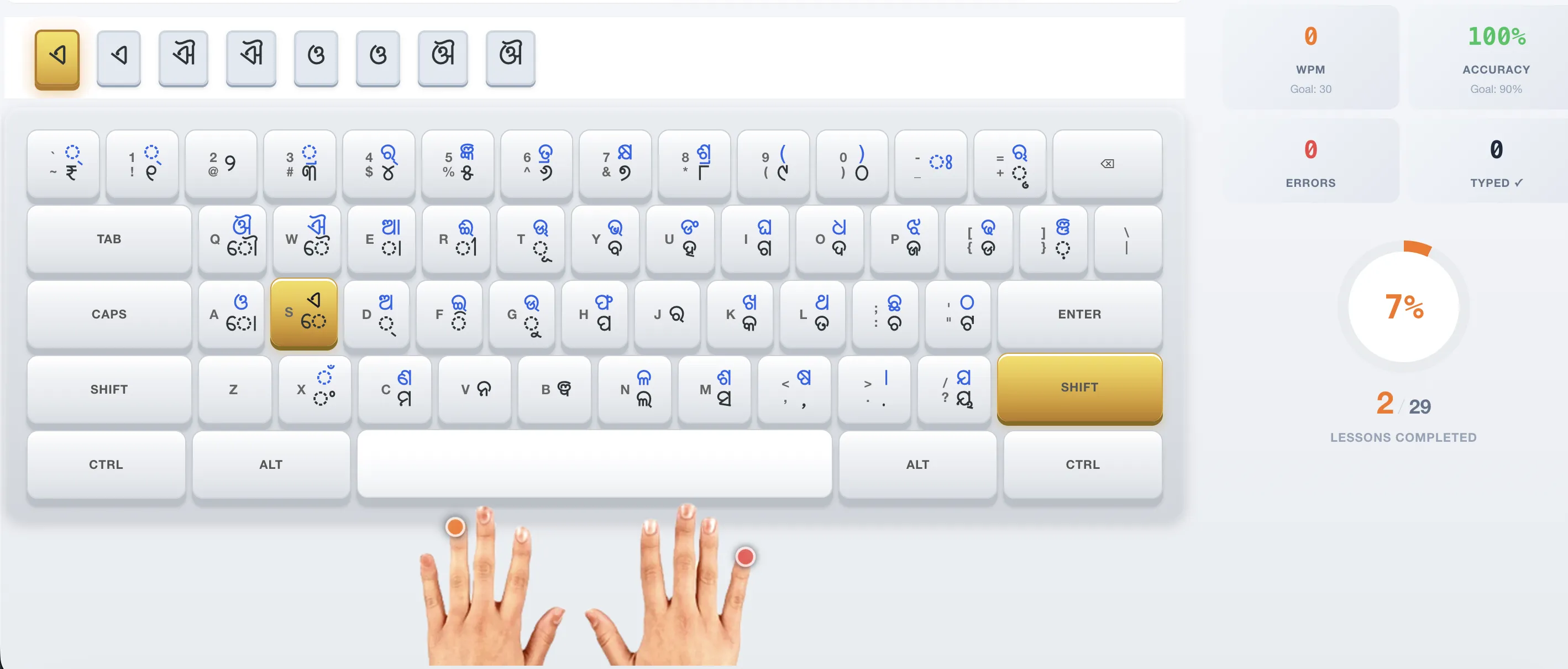
Our interactive Odia typing course with virtual InScript keyboard — practice directly in your browser
Course Structure (29 Lessons)
| Level | Focus | Lessons | Goal |
|---|---|---|---|
| Level 1 | Odia Vowels (ସ୍ୱର) | Lessons 1-7 | Learn all 11 vowels with matras |
| Level 2 | Basic Consonants | Lessons 8-13 | Master first 4 varga groups |
| Level 3 | Advanced Consonants | Lessons 14-17 | Complete remaining consonants |
| Level 4 | Odia Words | Lessons 18-22 | Type common Odia words fluently |
| Level 5 | Conjunct Letters (ଯୁକ୍ତାକ୍ଷର) | Lessons 23-25 | Handle complex conjunct formations |
| Level 6 | Sentences & Paragraphs | Lessons 26-28 | Type full Odia sentences at speed |
| Level 7 | Government Passages | Lesson 29 | Practice real OSSC exam passages |
4. Daily Practice Routine for Fast Results
Consistency is the secret to learning Odia typing in computerquickly. Based on data from thousands of learners, here's the optimal daily practice routine:
| Time | Activity | Duration |
|---|---|---|
| Morning | Complete 1 structured lesson + review previous lesson | 15-20 min |
| Afternoon | Speed drill — 2-minute burst on common Odia words | 10 min |
| Evening | Free practice or mock exam — type Odia sentences for speed | 10-15 min |
Research-Backed: Learners who practice for 30+ minutes daily reach 16 WPM in an average of 3.2 weeks. Those practicing less than 15 minutes/day take 6+ weeks to reach the same speed.
⚡ Try Our Speed Drills
1-minute, 2-minute, and 5-minute rapid typing drills to build finger memory.
Start Speed Drill →5. Speed-Building Techniques That Actually Work
Going from 10 WPM to 25+ WPM requires specific techniques. Here are the most effective speed-building strategies used by top performers in OSSC typing tests:
Focus on Accuracy First, Speed Second
In OSSC exams, wrong words deduct from your score. Aim for 90%+ accuracy before pushing speed. Our course shows real-time accuracy so you know exactly where you stand.
Use the Backspace Key Freely
Unlike some typing exams, OSSC allows unlimited backspace use. Correct mistakes immediately — only the final submitted text counts. Practice using backspace during drills.
Practice Common Odia Words
Government passages use standard administrative vocabulary. Our word lists and speed drills focus on words like 'ସରକାର', 'ଅଫିସ', 'ଆବେଦନ' that appear in real exams.
Simulate Exam Conditions
Practice with the same timer, same interface, and same passages used in the actual OSSC exam. Our mock exam simulator replicates the exact test environment — no surprises on exam day.
6. OSSC & OSSSC Exam Preparation
Different posts have different typing requirements. Here's exactly what you need for each exam:
| Exam / Post | Body | Odia Speed | English Speed | Scoring |
|---|---|---|---|---|
| Junior Grade Typist | OSSC | 16 WPM | 37 WPM | 25 marks each language |
| Typist-cum-Scribe Asst. | OSSC | 20 WPM | 40 WPM | 50 marks on merit list |
| Junior Assistant | OSSSC | 20 WPM | 40 WPM | Qualifying only (Pass/Fail) |
Important: Posts like OSSC CGL and OSSSC RI/ARI/AMIN require Odia language proficiency but do not have a dedicated Odia typing speed test. This guide is for posts that specifically include a Typing Skill Test.
🧪 Take a Full Mock Exam
Experience the exact OSSC exam interface — same timer, same passages, same scoring formula.
Start OSSC Mock Test →7. Common Mistakes & How to Avoid Them
After analyzing thousands of practice sessions, here are the most common mistakes learners make when trying to learn Odia typing in computer:
| Mistake | Why It Hurts | How to Fix It |
|---|---|---|
| Using phonetic keyboards | Not permitted in exams — wastes practice time | Switch to InScript immediately |
| Looking at the keyboard | Slows you down; affects neck posture | Use our on-screen key highlights to build touch-typing |
| Skipping basic lessons | Weak foundation leads to plateau at 10-12 WPM | Complete all vowel and consonant lessons first |
| Not tracking progress | No visibility into improvement areas | Create a free account to track WPM and accuracy |
| Practicing only in short bursts | OSSC Odia test is 25 minutes — builds stamina | Take full-length 25-min mock tests weekly |
8. Frequently Asked Questions
Can I learn Odia typing on a computer without installing anything?
Yes! Our Odia typing course runs entirely in your web browser with a virtual InScript keyboard. No downloads or installations are required. However, for OSSC/OSSSC exams, you will need the official InScript keyboard installed on the exam computer.
How many days will it take to learn Odia typing?
With 30 minutes of daily practice, most learners reach 16+ WPM within 3-4 weeks. To achieve 30+ WPM speed, consistent practice for 6-8 weeks is typical. Our course has 29 progressive lessons designed to take you from beginner to exam-ready.
What is the minimum typing speed for OSSC exam?
For OSSC Junior Grade Typist: 16 WPM in Odia and 37 WPM in English. For OSSSC Junior Assistant: 20 WPM in Odia and 40 WPM in English. Each language test carries 25 marks on the OSSC merit list.
Is the InScript keyboard mandatory for Odia typing exams?
Yes. The Odia InScript keyboard layout (BIS IS 16350) is the only keyboard layout permitted in Odisha government typing tests conducted by OSSC and OSSSC. Phonetic and transliteration keyboards are not allowed.
Can I use Google Input Tools or phonetic typing for practice?
No. While convenient for casual typing, phonetic and transliteration keyboards will not prepare you for the actual exam. You must practice with the official InScript layout. Our course teaches the exact layout used in government exams.
🎯 Ready to Master Odia Typing on Your Computer?
Join 4,000+ learners who have used our free Odia typing course to prepare for government exams. Start with Lesson 1 — it takes just 5 minutes.
Start Free Course Now →